A new iPhone model is released every year. As a result, there’s now a whole range of iPhones, each with its own model numbers and specifications. It’s only natural that you might sometimes ask yourself: Which iPhone do I actually have? To find out exactly which phone you’re holding and how old your iPhone is, we’ll show you two ways to determine which version of the Apple iPhone you’re using. This comes in handy if, for example, you want to order an iPhone case or other accessories.
Here’s how to find out which iPhone model you have
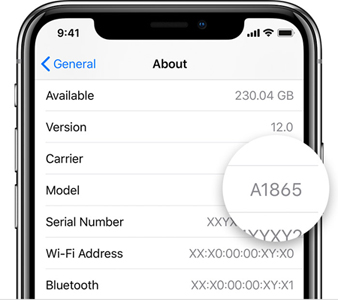
You can find your iPhone’s model number in your iPhone’s settings. Follow these steps to find out what type of iPhone you have:
- Open “Settings”
- Open the 'General' screen
- Tap the top option, “Info” or “About”
- If you scroll down, you’ll see “Model” followed by a number that starts with an M
- Tap this number, and it will change to a model number starting with an A.
For example, “iPhone model A1865.” This number is your iPhone’s model number. Look it up in the table below to quickly see which iPhone you have.
Now that you know the answer to the question “Which iPhone do I have?”, you’ll find an overview below of the various iPhone models produced by Apple, along with matching iPhone covers and cases that are suitable for your iPhone
Overview of iPhone Models and Types
| Model Number |
iPhone Model |
Matching Cases |
| |
iPhone 17 |
iPhone 17e cases |
| A3523 |
iPhone 17 Pro |
iPhone 17 Pro cases |
| A3526 |
iPhone 17 Pro Max |
iPhone 17 Pro Max cases |
| A3517 |
iPhone Air |
iPhone Air cases |
| A3520 |
iPhone 17 |
iPhone 17 cases |
| A3293, A3083, A3292, A3294 |
iPhone 16 Pro |
iPhone 16 Pro cases |
| A3296, A3084, A3295, A3297 |
iPhone 16 Pro Max |
iPhone 16 Pro Max cases |
| A3287, A3081, A3286, A3288 |
iPhone 16 |
iPhone 16 cases |
| A3290, A3082, A3289, A3291 |
iPhone 16 Plus |
iPhone 16 Plus cases |
| A3102 |
iPhone 15 Pro |
iPhone 15 Pro cases |
| A3106 |
iPhone 15 Pro Max |
iPhone 15 Pro Max cases |
| A3090 |
iPhone 15 |
iPhone 15 cases |
| A3094 |
iPhone 15 Plus |
iPhone 15 Plus cases |
| A2882 |
iPhone 14 |
iPhone 14 cases |
| A2886 |
iPhone 14 Plus |
iPhone 14 Plus cases |
| A2890 |
iPhone 14 Pro |
iPhone 14 Pro cases |
| A2894 |
iPhone 14 Pro Max |
iPhone 14 Pro Max cases |
| A2783 |
iPhone SE 2022 |
iPhone SE 2022 cases |
| A2633 |
iPhone 13 |
iPhone 13 cases |
| A2638 |
iPhone 13 Pro |
iPhone 13 Pro cases |
| A2643 |
iPhone 13 Pro Max |
iPhone 13 Pro Max Cases |
| A2628 |
iPhone 13 mini |
iPhone 13 mini cases |
| A2411 |
iPhone 12 Pro Max |
iPhone 12 Pro Max cases |
| A2407 |
iPhone 12 Pro |
iPhone 12 Pro cases |
| A2403 |
iPhone 12 |
iPhone 12 cases |
| A2399 |
iPhone 12 mini |
iPhone 12 mini cases |
| A2996 |
iPhone SE 2020 |
iPhone SE 2020 cases |
| A2221 |
iPhone 11 |
iPhone 11 cases |
| A2215 |
iPhone 11 Pro |
iPhone 11 Pro cases |
| A2218 |
iPhone 11 Pro Max |
iPhone 11 Pro Max cases |
| A1920, A2097 |
iPhone XS |
iPhone XS cases |
| A1921, A2101 |
iPhone XS Max |
iPhone XS Max cases |
| A1984, A2105 |
iPhone XR |
iPhone XR cases |
| A1865, A1901 |
iPhone X |
iPhone X cases |
| A1863, A1905 |
iPhone 8 |
iPhone 8 cases |
| A1864, A1897 |
iPhone 8 Plus |
iPhone 8 Plus cases |
| A1660, A1778 |
iPhone 7 |
iPhone 7 cases |
| A1661, A1784 |
iPhone 7 Plus |
iPhone 7 Plus cases |
| A1633, A1688, A1700 |
iPhone 6S |
iPhone 6S cases |
| A1634, A1687, A1699 |
iPhone 6S Plus |
iPhone 6S Plus cases |
| A1549, A1586, A1589 |
iPhone 6 |
iPhone 6 cases |
| A1723, A1662, A1724 |
iPhone SE |
iPhone SE cases |
| A1453, A1457, A1518, A1530, A1533 |
iPhone 5S |
iPhone 5S cases |
Why is it important to know which iPhone you have?
Knowing your iPhone model is crucial for various reasons, including purchasing compatible cases and accessories. Each model has specific dimensions and cutouts for cameras and buttons, making the right case or accessory essential for optimal protection and functionality. Furthermore, your iPhone model plays an important role when selling or trading in your device. The value of an iPhone can vary significantly depending on the model, and correctly identifying your iPhone ensures you receive a fair price. It’s also important to know which iPhone you have for software updates. Apple supports older models up to a certain point, after which updates are no longer available. Knowing which iPhone you have helps determine whether your device is compatible with the latest iOS version, which is essential for security and access to new features. Finally, when it comes to repairs, model information is needed to determine the correct parts. Identifying your iPhone model ensures that you can have maintenance and repairs performed.